Introduction
Have you ever wondered why some products solve real customer problems while others struggle to gain attention, even after investing significant time and money in development?
The difference often lies in how the problem is understood before a solution is created.
In today's competitive business environment, developing a product is not just about writing code, designing attractive interfaces, or adding advanced features. It is about understanding people's needs, identifying their challenges, and creating solutions that make their lives easier.
This is where Design Thinking comes into the picture.
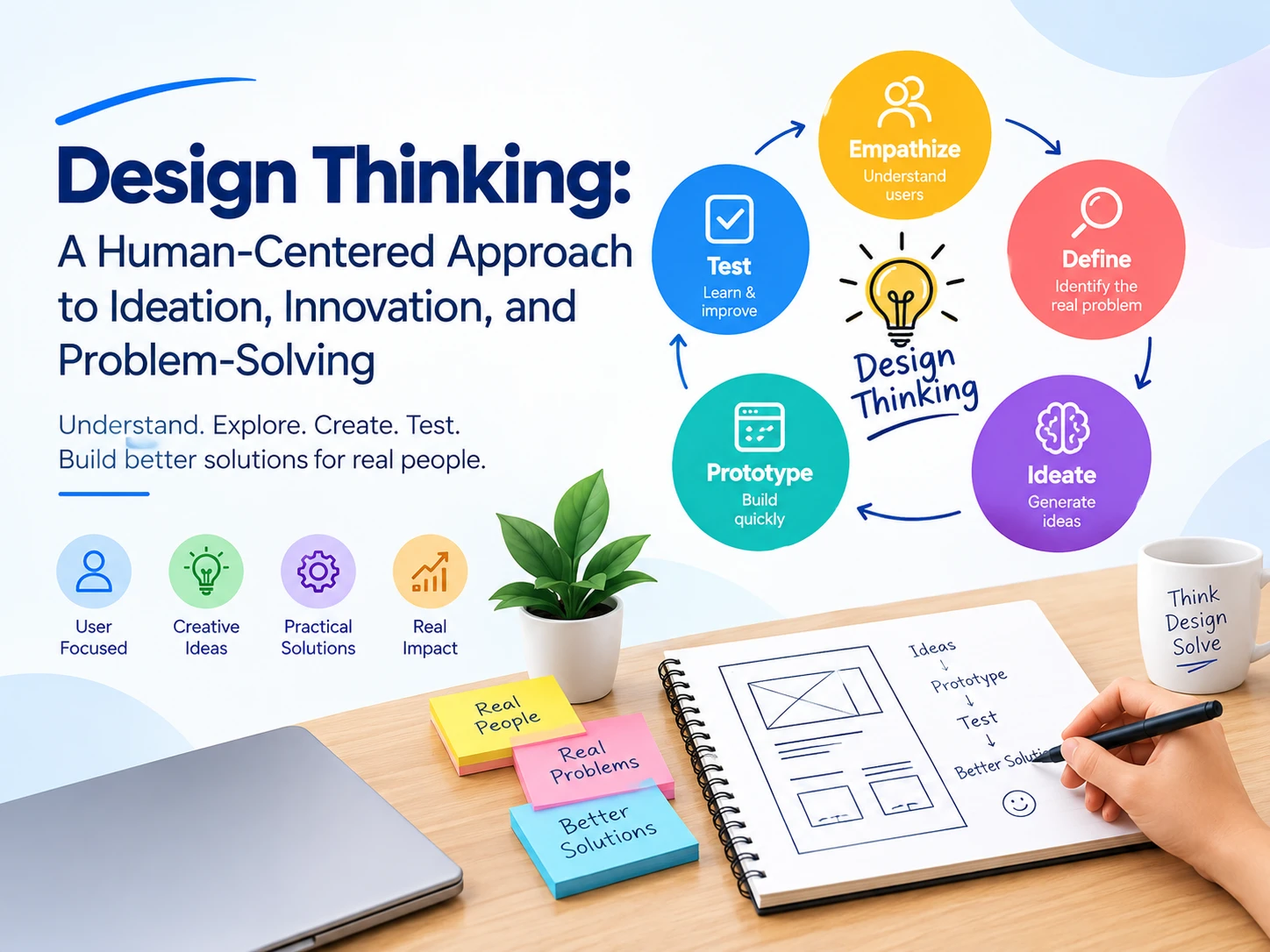
Design thinking is a human-centered methodology that helps teams understand problems, generate ideas, explore possibilities, and develop practical solutions through experimentation and continuous improvement. It is widely used in product design, software development, business strategy, user experience (UX) design, and innovation.
Rather than jumping directly into development, design thinking encourages teams to understand the people they are designing for, question assumptions, and test ideas before making major investments.
In this blog, we will explore what design thinking is, its five key stages, its benefits, and how businesses can use it to build better products and solve real-world problems.
What Is Design Thinking?
Design thinking is a structured yet flexible approach to solving problems by placing users at the center of the process.
It combines creativity, research, collaboration, experimentation, and analytical thinking to help teams identify the right problems and develop effective solutions.
Traditional development approaches sometimes begin with a predefined solution and focus on how to implement it. Design thinking takes a different approach: it starts by understanding the people experiencing the problem and explores multiple ways to address their needs.
For example, imagine a company wants to develop a mobile application for managing doctor appointments.
The company might initially assume that users need more features, such as appointment reminders, doctor profiles, online payments, and medical records.
However, after speaking with patients, the team might discover that the biggest problem is finding available appointments without making multiple phone calls.
This insight could lead to a simpler and more valuable solution: real-time appointment availability with easy booking and confirmation.
That is the essence of design thinking — understanding the real problem before deciding what to build.
Why Is Design Thinking Important?
Design thinking helps organizations move beyond assumptions and develop solutions based on actual user needs.
It is particularly useful when a problem is complex, customer expectations are changing, or the best solution is not immediately obvious.
Here are some reasons why businesses and development teams use this methodology:
-
Better understanding of users: Teams gain insights into user expectations, frustrations, and behaviors.
-
More effective problem-solving: Instead of addressing surface-level symptoms, teams investigate underlying problems.
-
Improved product usability: Solutions are designed around how people actually use products and services.
-
Reduced development risks: Testing ideas early can reveal issues before significant resources are committed.
-
Stronger collaboration: Designers, developers, business analysts, and stakeholders work toward a shared understanding.
-
More opportunities for innovation: Exploring different ideas encourages teams to discover approaches they may otherwise overlook.
Design thinking does not guarantee that every idea will succeed. Its real value is that it helps teams learn faster, make informed decisions, and improve solutions through feedback.
The Five Stages of Design Thinking
A widely used design thinking framework consists of five stages: Empathize, Define, Ideate, Prototype, and Test.
These stages provide a practical structure for understanding users and developing solutions. However, the process is not always linear. Teams may revisit earlier stages when testing reveals new information or when user needs change.
1. Empathize: Understand Your Users
The first stage is about understanding the people who will use your product or service.
Before designing a solution, you need to understand users' experiences, goals, challenges, and expectations.
This requires more than guessing what users want. It involves gathering information directly from them and observing how they interact with existing products or processes.
Common techniques include:
-
User interviews.
-
Surveys and questionnaires.
-
Observation and contextual research.
-
Customer feedback analysis.
-
Reviewing support requests and complaints.
-
Studying user behavior and existing workflows.
For example, if you are developing a school management application, you might interview teachers, parents, and school administrators.
Teachers may struggle with attendance records, parents may want timely updates about their children, and administrators may need accurate fee reports.
These conversations help you understand that different users experience the same system in different ways.
Key takeaway: Do not design based only on what you think users need. Learn from the people who will actually use your solution.
2. Define: Identify the Real Problem
Once you understand your users, the next step is to organize your findings and identify the core problem you want to solve.
During research, you may discover many challenges. The goal is to determine which problems matter most and express them clearly.
A well-defined problem helps the team focus its efforts and avoid wasting time on unnecessary features.
For example, rather than defining the problem as:
"We need to develop a better school management application."
You could define it as:
"School administrators need a simpler way to maintain accurate attendance records because their current manual process takes too much time and creates reporting errors."
This statement identifies the user, the challenge, and the reason it matters.
Useful techniques include:
-
Creating user personas.
-
Mapping the customer journey.
-
Identifying recurring pain points.
-
Grouping research findings into themes.
-
Writing problem statements.
-
Asking "Why?" to investigate underlying causes.
A clearly defined problem also helps stakeholders agree on what success should look like.
For example, success might mean reducing the time needed to record attendance, improving reporting accuracy, or making information easier for parents to access.
Key takeaway: Solving the right problem is often more important than developing a technically impressive solution.
3. Ideate: Generate Creative Solutions
After defining the problem, the team moves into ideation.
This stage encourages participants to explore multiple solutions rather than immediately choosing the first idea that comes to mind.
The objective is to create possibilities, challenge assumptions, and consider different approaches before selecting ideas for further development.
Popular ideation techniques include:
-
Brainstorming sessions.
-
Mind mapping.
-
Sketching user interfaces.
-
"How Might We" questions.
-
Crazy Eights, a rapid sketching exercise.
-
SCAMPER, a framework for exploring changes to existing ideas.
-
Collaborative workshops involving different team members.
For example, if patients find it difficult to book doctor appointments, the team could explore several possibilities:
-
A mobile application with real-time availability.
-
A website that allows patients to search by specialty.
-
Automated appointment booking through messaging.
-
A centralized system for managing cancellations and waiting lists.
-
A reminder system that helps patients avoid missed appointments.
Each idea has different benefits, costs, and implementation requirements.
The team can then evaluate ideas based on user value, feasibility, business goals, accessibility, and potential risks.
Key takeaway: Encourage creative thinking before narrowing down the options. The best solution may emerge from combining several ideas.
4. Prototype: Turn Ideas Into Something Tangible
A prototype is an early representation of a proposed solution. It helps teams explore how an idea might work before investing in complete development.
A prototype does not need to be a fully functional product. Depending on the problem, it could be a simple drawing, a clickable interface, a physical model, or a limited working feature.
In software development, common prototypes include:
-
Paper sketches.
-
Wireframes.
-
Interactive UI mockups.
-
Clickable Figma designs.
-
Landing page concepts.
-
Basic proof-of-concept applications.
-
Limited functional implementations.
For example, before building a complete doctor appointment application, a team could create a clickable prototype containing:
-
A doctor search screen.
-
A doctor profile.
-
Available appointment slots.
-
A booking confirmation screen.
Users can interact with the prototype and provide feedback about the navigation, clarity, and booking process.
This helps the team identify confusing steps before developers spend time implementing the entire application.
Key takeaway: Build only enough to learn what you need to know. A prototype is a learning tool, not necessarily a finished product.
5. Test: Validate Your Solution With Real Users
The final stage in the framework is testing.
At this stage, users interact with the prototype or working solution, allowing the team to observe what works, what causes confusion, and what needs improvement.
Testing should focus on user behavior rather than simply asking whether someone likes the design.
For example, you could ask participants to book an appointment using your prototype without explaining every step.
Observe whether they can find a doctor, understand available slots, complete the booking, and recognize the confirmation message.
If users struggle to understand a button or cannot find available appointments, that feedback can guide the next iteration.
Useful testing methods include:
-
Usability testing.
-
Prototype feedback sessions.
-
A/B testing where appropriate.
-
User acceptance testing.
-
Pilot launches.
-
Reviewing analytics and support feedback after release.
Testing may reveal that the team misunderstood the original problem. If so, it is reasonable to return to the Empathize or Define stage and rethink the approach.
That is why design thinking is an iterative process rather than a checklist that must always be completed in a fixed sequence.
Key takeaway: Test assumptions early, learn from real users, and improve the solution before scaling it.
How Design Thinking Works in Software Development
Design thinking can be integrated into the software development lifecycle to improve the quality of both the product and the development process.
Instead of treating design as a task that happens immediately before coding, teams can use design thinking from the earliest discovery discussions through product improvement after launch.
Here is how the stages connect with common software development activities.
Design thinking stage Software development activity Expected outcome Empathize User research and stakeholder interviews Clearer understanding of user needs Define Requirements analysis and problem definition Prioritized problems and objectives Ideate Feature planning and solution workshops Multiple possible solutions Prototype Wireframes, UI/UX design, and proof of concept Early representation of the solution Test Usability testing and validation Feedback to improve the product
Once a solution has been validated sufficiently, the development team can proceed with implementation, quality assurance, deployment, and ongoing improvement.
Design thinking complements methodologies such as Agile. Design thinking helps teams explore and validate what should be built, while Agile provides an iterative approach to delivering and improving the product.
The two approaches can work together throughout a project's lifecycle.
Real-World Example: Using Design Thinking to Build a Food Delivery App
Let's understand the process through a practical example.
Imagine a business wants to create a food delivery application for customers in a particular city.
Step 1: Empathize
The team interviews customers, restaurant owners, and delivery partners.
Customers mention uncertainty about delivery times. Restaurant owners report difficulty managing incoming orders during busy periods, while delivery partners struggle with unclear pickup instructions.
Step 2: Define
The team identifies three important challenges:
-
Customers need more reliable delivery estimates.
-
Restaurants need a manageable order workflow.
-
Delivery partners need clear pickup and delivery instructions.
Step 3: Ideate
The team explores possible features, including order status updates, estimated delivery times, restaurant order dashboards, delivery instructions, and notifications.
Instead of developing every proposed feature, the team prioritizes those most likely to address the identified problems.
Step 4: Prototype
The designers create clickable screens showing how customers place orders, restaurants accept them, and delivery partners receive assignments.
The team demonstrates the prototype to representative users.
Step 5: Test
Users try the prototype and provide feedback.
The team discovers that customers understand the order status but find the delivery estimate confusing. Restaurant staff also need a clearer way to distinguish new orders from orders already being prepared.
The design is revised before full development begins.
This process helps the business make decisions based on user feedback instead of relying entirely on assumptions.
Benefits of Design Thinking for Businesses
Design thinking is useful beyond software and interface design. It can help organizations rethink services, internal processes, customer experiences, and business models.
Better Customer Experience
Understanding customer pain points helps businesses create services that are easier to use and more aligned with real expectations.
Reduced Risk of Costly Changes
Validating a concept before full-scale development can uncover usability issues and incorrect assumptions earlier, when changes are often less expensive.
Improved Team Collaboration
Design thinking encourages people from different disciplines to contribute ideas. Developers can explain technical constraints, designers can explore usability, and business stakeholders can clarify commercial priorities.
More Effective Innovation
Exploring different solutions helps teams avoid becoming attached to the first idea. This creates more opportunities to discover practical and creative alternatives.
Better Product Decisions
User research and testing provide evidence that can help teams prioritize features and allocate resources more effectively.
The benefits depend on how well the methodology is applied. Poor research, limited user participation, or ignoring feedback can undermine the process.
Common Design Thinking Mistakes to Avoid
Although design thinking is straightforward in principle, teams can struggle to apply it effectively.
Here are some common mistakes to watch for:
1. Assuming you already understand the user.
Personal experience and stakeholder opinions are useful starting points, but they should not replace research with actual users.
2. Jumping straight into development.
Starting coding before the problem is sufficiently understood can lead to unnecessary features and expensive rework.
3. Choosing the first idea.
Explore different approaches before deciding which solution deserves further investment.
4. Spending too much time perfecting prototypes.
An early prototype should help answer questions. It does not need the polish of a finished product.
5. Testing only with internal team members.
Your colleagues may understand the product better than the intended audience. Include representative users whenever possible.
6. Ignoring negative feedback.
Critical feedback can reveal important usability issues. Investigate it rather than dismissing it because it conflicts with the team's assumptions.
7. Treating design thinking as a one-time activity.
User needs evolve. Continue gathering feedback and improving the product after launch.
Avoiding these mistakes makes design thinking more practical and helps teams focus on learning rather than simply completing each stage.
Best Practices for Implementing Design Thinking
To make design thinking a meaningful part of your workflow, consider these practices:
-
Involve users early: Gather insights before committing to a solution.
-
Include cross-functional teams: Bring designers, developers, business analysts, and relevant stakeholders together.
-
Define measurable goals: Identify what improvement should look like, such as fewer booking errors or faster task completion.
-
Keep prototypes simple: Use the lowest level of detail needed to test an assumption.
-
Encourage open discussion: Give team members space to suggest alternatives and challenge assumptions respectfully.
-
Test important assumptions: Focus research and experiments on questions that could significantly affect the outcome.
-
Document what you learn: Record feedback, decisions, and reasons for changing direction.
-
Iterate continuously: Treat each round of feedback as an opportunity to improve the solution.
Design thinking works best when teams see it as a way of working, not merely a workshop or design exercise.
Conclusion
Design thinking is a powerful, human-centered methodology for understanding problems, generating ideas, and developing solutions that meet real user needs.
Its five stages — Empathize, Define, Ideate, Prototype, and Test — provide a practical framework for moving from uncertainty to informed decisions. By applying these stages, teams can identify meaningful problems, explore alternatives, validate concepts, and continuously improve their solutions.
For businesses developing websites, mobile applications, digital platforms, or new services, design thinking can help bridge the gap between what a team wants to build and what users actually need.
The most important lesson is simple: Do not begin by asking how to build a solution. Begin by understanding which problem is worth solving.
When organizations combine user research, creative thinking, experimentation, and technical expertise, they are better positioned to develop products that deliver meaningful value.
Looking to Turn Your Ideas Into Digital Solutions?
At Kodesoft Technologies Pvt. Ltd., we help businesses transform ideas into practical digital products through website development, web application development, mobile app development, and digital solutions.
Whether you are planning a new application, improving an existing platform, or exploring an idea for your business, understanding your users and defining the right solution are important first steps.
Visit Kodesoft Technologies to learn more about our services.
Frequently Asked Questions (FAQs)
1. What is design thinking in simple words?
Design thinking is a problem-solving approach that starts by understanding people's needs and then develops, tests, and improves possible solutions.
2. What are the five stages of design thinking?
The five commonly used stages are Empathize, Define, Ideate, Prototype, and Test. Teams may move between these stages as they learn more about the problem and the proposed solution.
3. Why is design thinking important in software development?
It helps development teams understand user needs, prioritize meaningful features, test ideas before full implementation, and improve usability. This can reduce the risk of building a product that does not solve the intended problem.
4. Is design thinking only for designers?
No. Designers, developers, business analysts, product managers, entrepreneurs, and other professionals can use design thinking to solve problems and improve products or services.
5. What is the difference between design thinking and traditional problem-solving?
Traditional approaches may begin with a known problem and move directly toward a solution. Design thinking emphasizes understanding users, questioning assumptions, exploring multiple ideas, and validating solutions through experimentation.
6. How does design thinking help innovation?
It encourages teams to explore alternatives, learn from users, and experiment with new approaches. This can reveal opportunities that might be missed when teams rely only on assumptions or established processes.
7. Can design thinking be used in Agile development?
Yes. Design thinking can help teams understand and validate user needs, while Agile supports iterative development and delivery. Combining the two can help teams build products that are both useful and adaptable.
8. What tools are used in design thinking?
Common tools include user interviews, empathy maps, customer journey maps, brainstorming, mind maps, wireframes, prototyping tools such as Figma, and usability testing. The right tools depend on the problem being investigated.
9. What is the main goal of design thinking?
The main goal is to develop solutions that address real human needs while considering technical feasibility and business viability.


Comments: